
Why a free payslip generator, and not payroll software
Payroll software is built for a hundred employees, a tax filing calendar and an accountant who logs in every morning. Most people who need a payslip have three staff, or one. They need a document, not a system.
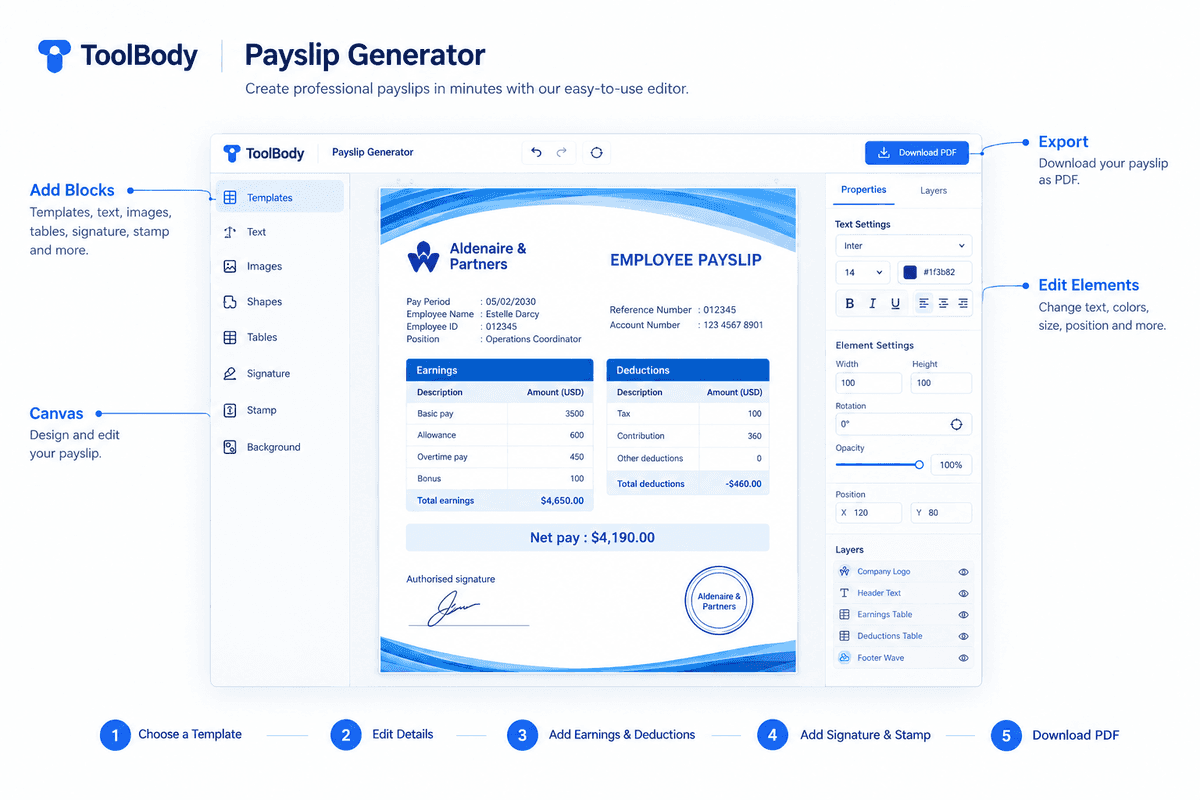
That is what this tool makes. You add the employee, the pay period, the earnings and the deductions, and it produces a print-ready payslip PDF. There is no account to create, no trial to remember to cancel, and no "upgrade to remove watermark" moment at the end. What you see on the canvas is the file you download.
It also doesn't assume where you are. A payslip in Dubai carries housing and transport allowance; one in Karachi has EOBI and provident fund; one in London has PAYE and National Insurance. The lines are yours to name, so the payslip reads the way payslips read in your country.
Payslip, salary slip, pay stub — same document
The name changes with the map, the paper doesn't.
Payslip — the usual word in the UK, Ireland, Australia, and most of the Gulf.
Salary slip — what it's called across Pakistan, India, Bangladesh and often in the UAE.
Pay stub — the US and Canadian term, from the tear-off strip that used to come with a paper cheque.
Wage slip — older UK usage, still common for hourly and weekly pay.
Whatever you call it, it answers three questions for one pay period: what was earned, what was deducted, and what was actually paid. This generator makes all of them — the layout is the same, only the labels change.
Who this is built for
A payslip is a record an employer issues to an employee. Use this if you run the payroll, or if your employer will check and approve what you prepare — the figures on it have to be the figures that were actually paid.
Small business owners doing their own payroll. A shop, a clinic, a trading company, a workshop. You pay five people on the 28th and each of them wants a slip for their file. Make one, change the name and figures, download the next.
Employers of domestic staff. Drivers, housekeepers, nannies, cooks. A written record of what was paid, and when, protects both sides — and several countries now require one for sponsored domestic workers.
Freelancers and contractors paying themselves. If you run a one-person company and need to show a bank, a landlord or an embassy what your company pays you, a monthly payslip is the document they expect.
Employees who never received one. Your employer pays on time but has never issued a slip. You can prepare one from your contract and bank transfers and ask your employer to check, sign and stamp it. A payslip is issued by an employer: prepared this way it is a draft until they approve it, and the figures have to match what was actually paid.
Startups before the HR system arrives. The first eight hires get paid before anyone has chosen a payroll platform. This fills the gap without committing you to anything.
What to put on each line
The tool doesn't force a structure, so here is how a clean payslip is usually laid out.
Earnings go first, each on its own line: basic salary, then allowances (housing, transport, food, phone), then variable items (overtime, commission, bonus, arrears). Keep basic and allowances separate — banks and end-of-service calculations look at basic pay on its own.
Deductions follow, also itemised: income tax or TDS, pension or provident fund, social insurance (EOBI, ESI, GOSI, National Insurance), loan or advance repayment, unpaid leave, and anything else agreed in writing. A deduction that isn't named is a deduction the employee will query.
Totals are gross earnings, total deductions and net pay. The tool calculates these as you type, so they can't drift out of line with the rows above them.
Payment details close the slip: how it was paid (bank transfer, cash, cheque), the date, and where relevant the last four digits of the account or a WPS reference. Then an authorised signature and, if you use one, a company stamp — both can be added directly on the canvas with the signature maker and stamp maker.
Country notes
This page can't give legal advice, but a few practical points come up often enough to mention.
United Arab Emirates. Salaries for most private-sector employees go through the Wage Protection System (WPS), so the payslip should match the WPS transfer. Basic salary is normally shown separately from allowances because gratuity is calculated on basic only. There is no income tax line. Banks asking for "last three payslips" for a loan or credit card expect a company stamp and signature.
Pakistan. Salary slips commonly show basic, house rent, utilities and medical allowance as earnings, with income tax, EOBI and provident fund as deductions. Employees need them for bank accounts, loans and visa files, and employers keep them for tax filing.
India. Standard components are Basic, HRA, conveyance and special allowance on the earnings side; PF, professional tax, ESI and TDS on the deductions side. Many slips also print net pay in words.
United Kingdom. Employers must give an itemised payslip on or before payday showing gross pay, deductions (PAYE tax, National Insurance, pension) and net pay, and for variable-hours staff the hours worked.
United States. Requirements vary by state. Most pay stubs show gross wages, federal and state withholding, Social Security, Medicare and net pay, often with year-to-date figures alongside the current period.
If your country isn't listed, the six standard sections above still apply — add the deductions and allowances your local rules name.
Mistakes that get payslips rejected
Banks, embassies and auditors see thousands of these. The ones they send back share a few faults:
Net pay doesn't match the bank transfer. The single most common reason a payslip is questioned. Prepare the slip from the actual payment, not from the contract.
Round numbers everywhere. Real payroll has odd amounts — tax, pro-rated days, deductions. A slip showing 10,000 gross, 0 deductions, 10,000 net looks made up even when it isn't.
No period or pay date. "Salary" without a month is not a record of anything.
Missing employer details. Company name, address and ideally a registration or trade licence number. A payslip with only the employee's name on it proves nothing.
No signature or stamp. Not always legally required, but reviewers expect one. Add both before you export.
Inconsistent layout month to month. If you're producing several months at once, keep the same template and only change the figures and period. The draft stays in your browser, so you can reopen last month's slip and edit it.
A note on using this honestly
A payslip is a statement of fact about money that changed hands. Creating one that shows pay that was never made — to get a loan, a visa, a tenancy or a job — is fraud in essentially every country, and banks and immigration officers cross-check against bank statements as a matter of routine. This tool exists so that genuine small employers and self-employed people can produce a proper document without paying for software. Use it for that.
Everything stays on your device
Your draft stays in your browser. The editor runs on your device; when you export the PDF, the document is sent to our server to be rendered, held for five minutes, and deleted. The draft you see when you come back is saved in your browser's local storage — not on a server. There is no account, so there is nothing for us to sell. Close the tab and the payslip is still yours; clear your browser data and it's gone.
Need a different document?
The same editor makes invoices if you are billing a client rather than paying an employee. For the signature line, draw or type one with the signature maker and download it as a transparent PNG. If your payslips need a company seal, design one in the stamp maker and drop it straight onto the canvas.