
How to write a quotation a client can say yes to
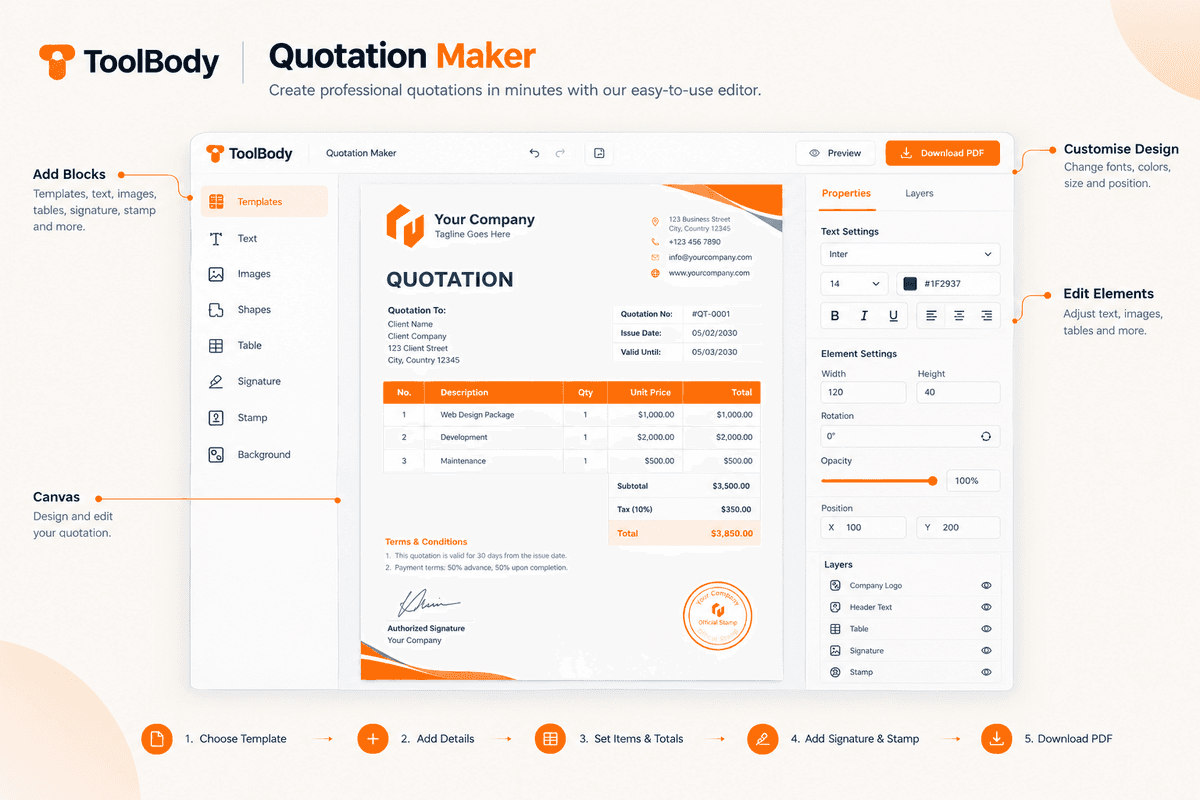
A good quotation does three things: it tells the client exactly what they are buying, what it costs, and how long that price stands. Everything else on the page is there to make saying yes easy and arguing later hard. Here is how to build one with the free quotation maker, and what to think about at each step.
1. Start with who and when
Put your business name and contact details at the top, then the client's. Add a quotation number and today's date. The number is yours to invent — QT-2026-014, or your initials and a running count — but keep the format consistent, because it is what the client will quote back when they accept and what your invoice will reference when you bill.
2. Describe the work in the client's words
Each line item should be readable by someone who does not do your job. "Supply and fit 12 m of kitchen worktop, laminate, including edging" is a line a client can approve. "Worktop" is not. If the client asked for something specific in their brief, use their phrasing so they can match the quote to what they asked for.
Quantity, unit price and line total go on every line. The editor adds the lines up and applies the tax, so the figure at the bottom is never one you typed by hand — which is the point. A quotation with a wrong total is the fastest way to lose a job you had already won.
3. State the tax the way it is stated where you are
Say whether your prices include tax or have it added on top, and name the tax the way it is named locally — VAT, GST, sales tax. Clients compare quotations, and a price that is silent on tax will be compared unfairly with one that is not. Set the currency you price in, too; a quotation in the wrong currency is a quotation that gets re-requested.
4. Give it an expiry
Valid for 14 days. Valid until the end of the month. Valid for 30 days from the date above. Pick one and write it on the page. Material costs move, your calendar fills, and without a date the price you gave last winter is still a price you gave. The validity date is also a polite reason to follow up: "the quote expires Friday, did you want to go ahead?"
5. Say what is not included
This is the line most quotations leave off and most disputes come back to. Delivery. Materials the client is supplying. Revisions beyond the second round. Anything charged hourly beyond the estimate. Site access, parking, permits. Write the exclusions plainly under the line items and the conversation about them happens now, when it is cheap, instead of on the final invoice, when it is not.
6. Tell them how to accept
A quotation nobody knows how to accept sits unanswered. Add a signature line and a sentence: "To accept, sign and return this quotation" or "Reply to this email with 'approved' and we'll schedule the work." If you take a deposit, say the amount and when it is due. The signature line is a block in the editor, and if you want the quotation to carry your own signature and company stamp as well, both can be made with the other tools and dropped straight onto the page with transparent backgrounds.
Quotation, estimate or proposal?
The words get used loosely, and the reader will assume whichever one you did not mean unless you say.
A quotation is a fixed price you will honour until it expires. Once accepted, it is the price.
An estimate is your best guess, expected to move as the work becomes clearer. Label it as one, and say what would change it.
A proposal is a quotation with an argument attached — why this approach, why you. It is usually longer and comes before a quotation, not instead of one.
The same editor makes any of them. Change the heading, keep the line items, and the document reads as whatever you need it to be. When the client accepts, the invoice maker takes the same line items forward, so the bill matches the quote — which is the single most common thing clients check.
What different trades put on a quotation
The six essentials — reference, expiry, priced lines, tax, exclusions, how to accept — are the same for everyone. What goes into the line items is not.
Building, plumbing, electrical and other site work. Separate materials from labour, and labour into days or hours with a rate. Note who supplies what. Add a line for waste removal or skip hire if it applies, because it is the cost clients forget to expect.
Design, web and creative studios. Quote the deliverable, not the hours: "Logo suite, three concepts, two revision rounds, final files in SVG and PNG." Say how many revisions are included and what an extra round costs. State who owns the work on payment.
Suppliers and wholesale. Price per unit at the quantity quoted, and say the price is for that quantity — a smaller order may cost more per unit. Delivery terms and lead time belong on the quotation, not in a later email.
Events, catering and hire. Per-head or per-item pricing, a headcount or item count the price is based on, and a date by which changes to that count are free.
Consultants and professional services. A fixed fee for a defined scope, or a day rate with an estimated number of days and a cap. Say what happens if the scope grows.
Common mistakes that cost the job
No expiry date. The client comes back six months later expecting the same price.
A lump sum with no breakdown. Clients cannot see what they are paying for, so they assume it is too much.
Tax not stated. Your quote looks 15–20% more expensive than a competitor's that quietly excluded it — or you lose the margin when the client assumes it was included.
Vague scope. "Website design" means something different to every client. Write down pages, features, and what is out.
No way to accept. The client liked it, meant to reply, and forgot.
A total you typed yourself. One transposed digit and the quote is either underpriced or looks careless. Let the editor add it up.
Sending it and following up
Export the PDF and attach it to a short email that says what the quotation is for and when it expires. Keep the file name useful — Quotation QT-2026-014 – Kitchen worktop – Acme Ltd.pdf — because the client will search for it later. If you have not heard back a few days before the expiry, one follow-up that mentions the date is reasonable and usually welcome.
When the client accepts, keep the signed or approved copy with the job. If anything is questioned later, the quotation is the document both of you agreed against.
Why the quotation maker works the way it does
It runs in your browser. Nothing you type — client names, prices, margins — is uploaded anywhere. The draft stays on your device, so you can close the tab, come back tomorrow and pick up where you left off, with no account to log into.
The totals calculate themselves. Type quantities and unit prices; the line totals, subtotal, tax and grand total update as you go.
The document is yours. The PDF carries no ToolBody branding, no watermark, no "made with" footer. It looks like your quotation because it is.
It works with the other tools. Make a signature with the signature maker and a company stamp with the stamp maker, drop both onto the quotation, then carry the accepted lines into an invoice. One set of free online tools, one workflow from quote to payment.
Open the editor, add your first line item, and you will have a quotation ready to send in a few minutes.