Why use a free invoice maker online instead of a template?
A Word or Excel invoice template means formatting battles every time you add a line item columns shift, totals break, fonts don't match your logo. A free invoice maker online does the layout math for you: totals recalculate live, the design stays consistent, and you export a clean PDF instead of a fragile .docx that looks different on every computer that opens it.
That's the real gap this tool fills: template flexibility, without template maintenance.
Send your invoice today, not after a 20-minute signup
You've finished the work. You want to send the invoice. You open Google, find a "free invoice generator", and it asks for your email before you've even seen the form. Then a free trial. Then a "verify your inbox". Forty minutes later you're still not paid.
The ToolBody Free Invoice Maker Online is built for the other version of that story. Open the page, fill in the form, hit download. Done. Your client gets a clean PDF no ToolBody logo, no "made with" footer, no watermark and you can go back to actual work.
↑ Start your invoice now (no sign-up)
What makes this invoice maker different
A lot of "free invoice generators" exist. The honest differences here come down to specific things most of them get wrong:
Built-in signature and stamp on the invoice
This is the big one. Most free invoice tools let you make the invoice but stop there. The ToolBody Invoice Maker has built-in fields for uploading or drawing a signature and adding a company stamp — both appear on the final PDF, exactly where you'd expect them. So when your client opens the invoice, they see a signed, stamped, finished document. Not a half-baked draft.
This is genuinely uncommon. We checked the top "invoice maker with stamp and signature" results and most of them either don't support it, or bury it three menus deep. Here it's a first-class feature.
Genuinely free — no sign-up, no watermark, no caps
No registration. No email, no password, no confirmation link.
No watermark on the PDF. Your invoice carries your branding only.
No monthly limit. Make one invoice a year or fifty a month — same experience, same zero cost.
No payment details stored. We don't have a billing system. There's nothing to cancel.
Auto-calculated totals
Type quantities and rates. The subtotal, tax, discount, and grand total update as you go. No manual maths, no formulas to fix, no embarrassing "actually the total was wrong" follow-up email.
Drafts that survive a closed tab
Got interrupted? Close the tab. When you come back on the same browser, your draft is still there. No account needed for this — your draft lives in your own browser, not on our servers.
Signature & stamp on the invoice — the part nobody else does
Across most of the world — and especially in the UAE, the wider Gulf, much of Asia, and a lot of small-business Europe — a serious invoice carries two things at the bottom: the issuer's signature and the company stamp. It's not a legal requirement everywhere, but it's a strong professional convention. A signed and stamped invoice reads as final. A naked invoice reads as a draft.
Most free invoice generators ignore this entirely. They were built for a North-American-software model where signatures and stamps don't matter, so the feature isn't there.
The Invoice Maker has both, prominently:
Signature. Draw your signature directly in the editor with a mouse, trackpad, or touchscreen. Or upload an existing transparent-PNG signature (you can make one in the Signature Maker).
Stamp. Upload your company stamp as a transparent PNG. Don't have one yet? Design one in the Stamp Maker — round seal with name and registration number, "PAID" mark, whatever you need.
The final PDF carries both in the signature/stamp area. The whole signed-and-stamped invoice loop, end-to-end, takes about three minutes — and uses three free ToolBody tools that talk to each other.
How to make an invoice in three steps
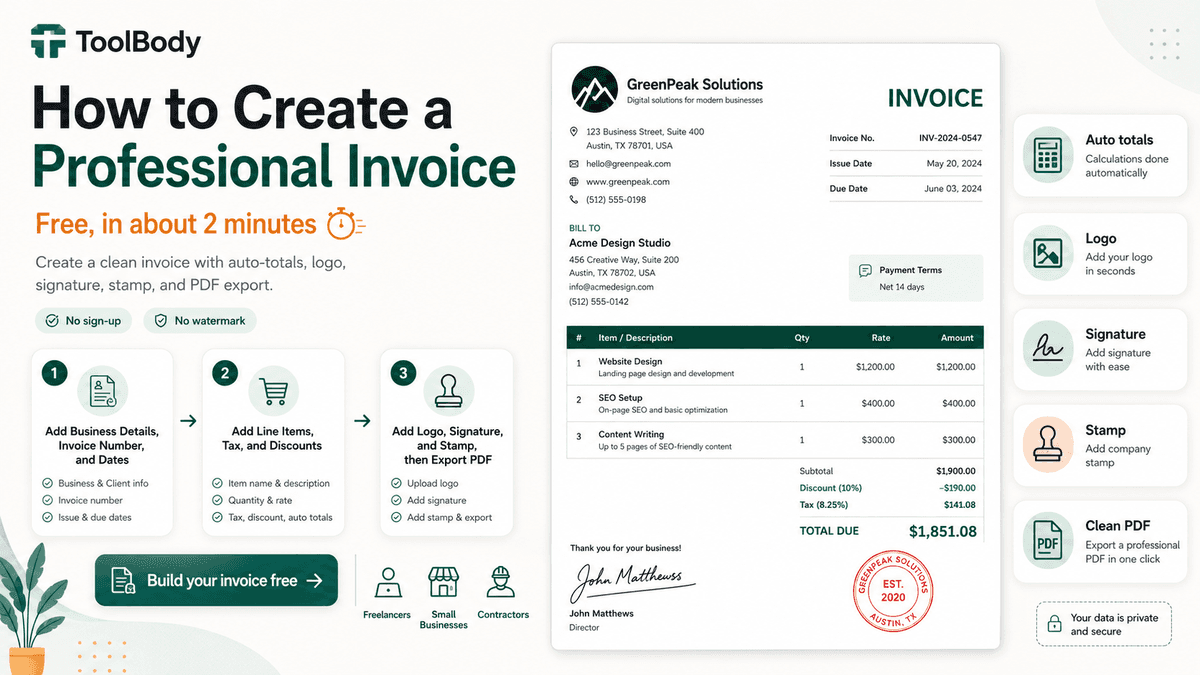
Step 1 — Add your business and client details
Enter your business name, address, contact info, and upload your logo (PNG or SVG). Add your client's name and address. Set the invoice number, the issue date, and the due date. The header of your invoice fills in as you go.
If you have a brand colour, use it — the editor lets you set an accent colour so the invoice matches your other client-facing documents.
Step 2 — Add line items, tax, discount, and signature/stamp
Add each product or service: description, quantity, rate. The subtotal calculates instantly. Set a tax rate (flat percentage — works for VAT, GST, sales tax, or any local equivalent). Apply a discount if needed.
Then — optionally but recommended — upload or draw a signature, and upload your company stamp. Both show up in the preview as you add them, in the signature/stamp area at the bottom of the invoice.
Step 3 — Download as PDF
One click. The PDF saves to your device. It's a standard A4 layout — works for email, works for print, works for storing as a record. The file has no ToolBody branding, no watermark, no "free trial" footer.
Send it to your client. Done.
What every invoice should include
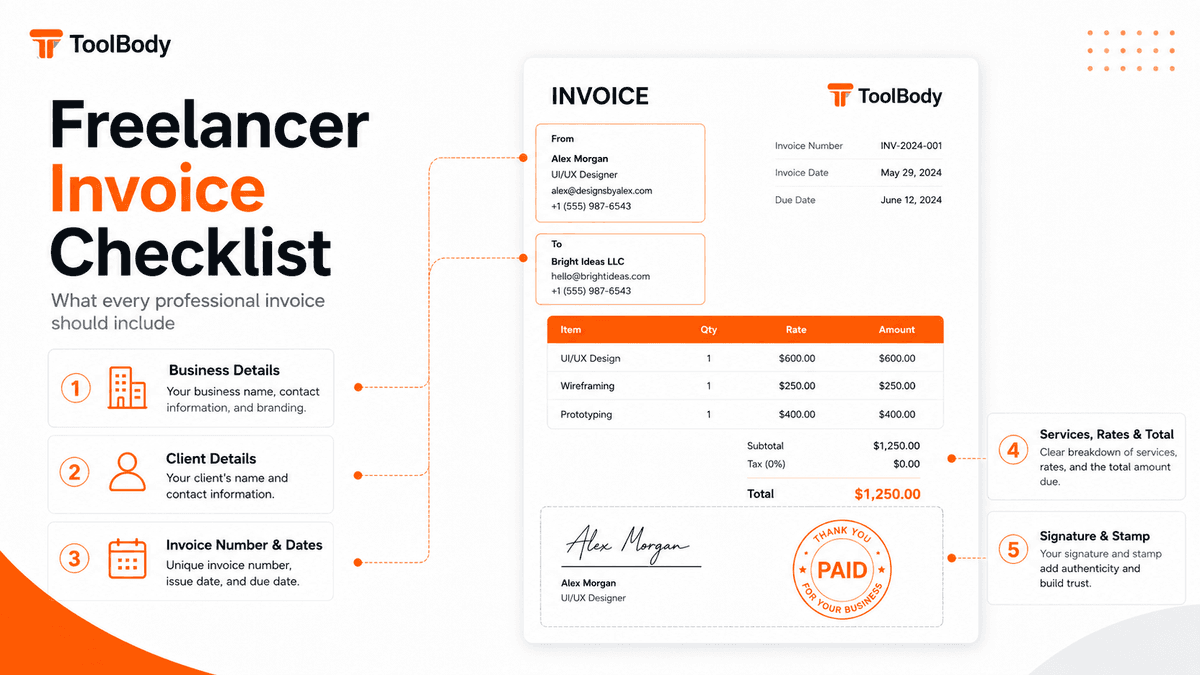
If you're new to invoicing — or you've been using a half-broken template for years and you're not sure what's actually missing — here's a quick checklist. The Invoice Maker has fields for all of these:
Your business name and contact information (address, phone, email)
Your business registration or tax number if you have one (TRN, VAT number, GST number, business registration number — whichever applies in your country)
Client's name and address
Invoice number — sequential, unique. "INV-001", "2026-001", whatever your convention is. Don't skip this; it's how you track payments and how your client references the invoice.
Issue date and due date — explicit due dates get paid faster than vague "net 30" notes.
Line items — clear description, quantity, rate. Vague line items invite disputes.
Subtotal, tax, discount, total — all visible, all separated. The total goes last and should be unmissable.
Payment terms and methods — how the client pays you (bank transfer details, payment link, etc.) and any late-payment terms.
Signature and stamp — for jurisdictions and clients that expect them.
A few mistakes that come up constantly in invoices new freelancers send out: missing invoice number, missing due date, no clear total, no tax breakdown when tax is included, and no payment instructions. All five are 30 seconds of work that prevent slow payment.
Who actually uses this tool
Freelancers and independent contractors
You finish a project. You need to invoice. You don't have accounting software because you don't need accounting software — you have five clients, not five hundred. The simple invoice maker for freelancers angle is built around exactly this: clean invoice in under two minutes, no monthly cost, no learning curve.
Small business owners
You're running the whole show — sales, ops, admin, billing. You bill irregularly and you don't want £29/month going out for a tool you use four times a month. The Invoice Maker covers the billing job without the subscription.
Contractors and tradespeople
You finish a job, you want to leave with the invoice already on the client's phone. The mobile editor + PDF download lets you generate and send from site, no laptop required.
Service businesses (consultants, agencies, tutors, cleaners, photographers)
Service invoices are nearly all the same: line item, rate, total, optional tax. The Invoice Maker handles them in the same simple flow whether you charge by the hour, by the project, or by the deliverable.
Anyone who needs a one-off invoice
Selling something used? Doing a one-time gig? You don't want to sign up for a SaaS to send a single invoice. Make it here, download it, never come back if you don't need to. No hard feelings.
Why the gated "free" tools are the actual problem
A specific complaint, because it shows up everywhere: a lot of "free invoice generators" are really lead-gen funnels for paid accounting software. The pattern goes:
You search "free invoice generator no sign up".
You find a tool. It looks promising.
You fill in the invoice.
You hit download — and now it asks for your email.
After signing up, you find out the free version is limited to 3 invoices, or watermarks the PDF, or doesn't actually let you customise the layout.
The "real" version is £15/month.
The ToolBody Invoice Maker isn't a funnel. There's no upgrade page because there's no paid tier. There's no "premium feature locked" badge because there's no premium. The whole product is the free product.
What we are: a small, focused, browser-based tool that does one job well — generates clean invoices that you can download as PDFs. What we're not: a CRM, an accounting platform, a payments processor, or a subscription management service in disguise.
Printable, mobile-friendly, no surprises
A few small details that matter when you actually try to use an invoice:
A4 PDF, print-ready
The downloaded PDF is standard A4 with proper margins. Drop it on any printer and it prints clean — no manual scaling, no cut-off edges. Printable invoice maker in the most literal sense.
Mobile and tablet support
The editor works on phones and tablets. Create an invoice on your phone in five minutes between meetings. The PDF downloads to your device exactly as it would on a laptop.
Local storage, no server-side data
Your draft is saved in your own browser. We don't store your invoice on our servers — which means we can't lose it, leak it, or be subpoenaed for it. It also means if you switch browsers or devices, you start fresh.
Multiple invoices, no juggling
Make as many invoices as you need. There's no monthly count, no "you've used 3 of your free invoices this month" nag screen, no "upgrade to make a fourth invoice" dialog.
What the Invoice Maker isn't
A short honest note, because shooting straight is faster than over-promising:
Not an accounting platform. This tool generates an invoice as a PDF. It doesn't track who's paid, calculate quarterly tax owed, or send late-payment reminders. If you need full accounting, get accounting software.
Not a payment processor. You can write your bank or payment details on the invoice, but the actual payment happens off-platform. There's no Pay Now button that charges your client through ToolBody.
Not a recurring-billing system. If you bill the same client the same amount every month, you'll just regenerate a similar invoice each cycle — there's no automation here. For genuine recurring billing, a subscription-billing tool will suit you better.
Not tax advice. The Invoice Maker has fields for tax rates and tax numbers, but it doesn't tell you what tax rate to charge or whether you need to register for VAT. That's your accountant's job, or the relevant tax authority's documentation.
For everything else — generating a clean, professional, signed-and-stamped invoice as a downloadable PDF in under two minutes — this is exactly the tool.
Works hand-in-hand with the other ToolBody tools
The Invoice Maker is part of a small set of tools that work together:
Use the Stamp Maker to design your company stamp, then upload it into the invoice's stamp field.
Use the Signature Maker to generate a transparent-PNG signature, then upload it into the invoice's signature field.
Or draw the signature directly in the Invoice Maker if you'd rather skip the round-trip.
End-to-end signed-and-stamped invoice workflow, three free tools, zero accounts. Open the Stamp Maker Open the Signature Maker Free Payslip Generator
Why ToolBody exists (the short version)
Big companies have invoicing software, accounting platforms, and finance teams. Small businesses and freelancers don't — and they shouldn't need any of that just to bill a client.
ToolBody is the in-between answer. Free tools that do one thing well, in the browser, with no accounts and no watermarks. The Invoice Maker is the centrepiece — the tool most people land on first — and the Stamp Maker and Signature Maker make it feel finished.
More tools are coming. The model doesn't change: free forever, browser-based, no sign-up, no watermark, no upsell.