Salary Slip Generator - Create a Salary Slip PDF Online for Free
Create a professional salary slip online in minutes. Learn the correct salary slip format, use a ready payslip template, and download a clean salary slip PDF for free.
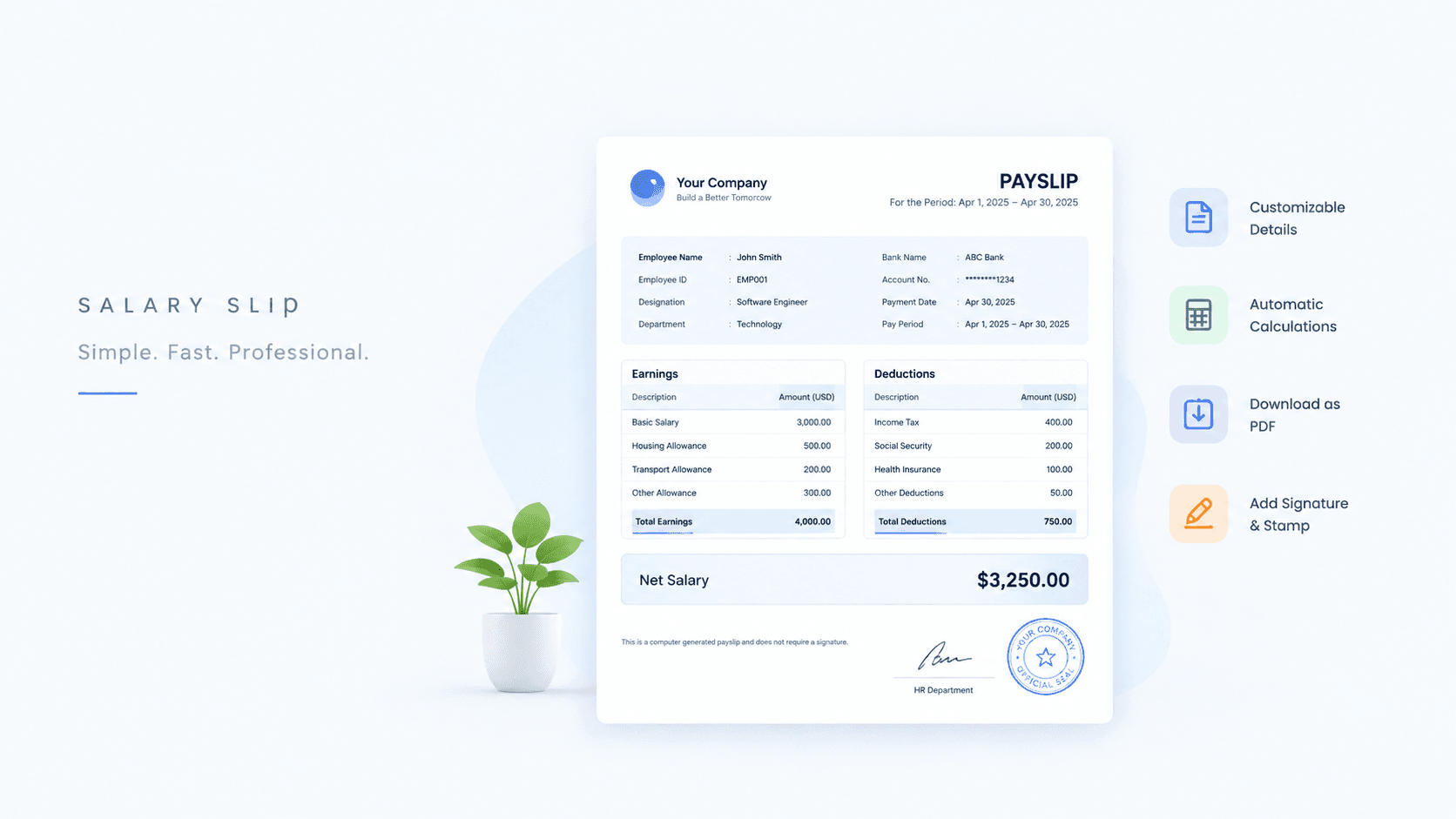
A salary slip is one of the most requested documents in any workplace. Employees need it for loan applications, visa processing, rental agreements, and tax filing. Employers need it to keep clean payroll records. Yet many small businesses still create salary slips in Word or Excel, retyping the same layout every month.
A salary slip generator removes that work. You enter the company details, the employee details, the earnings and deductions, and the tool calculates net pay and gives you a clean salary slip PDF. This guide explains what a proper salary slip format looks like, how to use a payslip template correctly, and how to generate your first slip in a few minutes.
What is a salary slip?
A salary slip, also called a payslip, is a document issued by an employer to an employee for each pay period. It shows how the gross salary was calculated, what was deducted, and what amount was finally paid. It acts as proof of income and proof of employment.
In most major economies an itemised pay statement is a legal duty rather than a courtesy. In the UK section 8 of the Employment Rights Act 1996 requires one at or before every payment, and since April 2019 it is owed to every worker, not only employees. Section 536 of Australia’s Fair Work Act 2009 gives employers one working day from payment. Germany’s Gewerbeordnung § 108 and section 254 of the Canada Labour Code impose the same duty.
The United States is the notable exception. There is no federal requirement to give anyone a pay statement — 29 CFR 516.2 only obliges an employer to keep payroll records — so the duty comes from state law, and a number of states impose none at all. Even there, a clear salary slip prevents disputes and makes tax season easier for everyone.
Salary slip format: what a proper salary slip contains
The most common question people search for is the correct salary slip format. While layouts vary by company and country, a professional salary slip always includes these sections.
1. Company details
Company name and logo
Company address
Company registration or tax number, if applicable
2. Employee details
Employee name
Employee ID or code
Designation and department
Date of joining
Bank account number (often partially masked)
PAN, Emirates ID, or other tax identifier, depending on the country
3. Pay period and payment date
Month or date range the slip covers
Date the salary was paid
Number of working days and days paid
4. Earnings
Basic salary
House rent allowance (HRA)
Transport, medical, or special allowances
Overtime or bonus
Gross earnings total
5. Deductions
Income tax or withholding tax
Provident fund or pension contribution
Insurance premiums
Loan or advance recovery
Total deductions
6. Net pay
The amount actually transferred to the employee, usually shown both in numbers and in words.
7. Authorisation
A signature, company stamp, or a "computer-generated, no signature required" note. Many companies add a digital stamp here, which you can design with a free online stamp maker.
If your current slip is missing any of these sections, it is worth updating your template before the next pay run.
Why use a payslip template instead of starting from scratch
A payslip template gives you a fixed structure so that every slip looks the same, month after month. This matters for three reasons.
Consistency. Banks and government offices often compare several months of slips. If the layout changes each time, it raises questions.
Accuracy. A template with built-in totals removes manual arithmetic errors. Gross pay, deductions, and net pay are calculated for you.
Speed. Once the template holds your company details, creating a slip for a new employee takes a minute or two.
ToolBody's payslip generator opens with a pre-filled sample slip, so you can see the structure immediately and replace the sample values with your own.
How to create a salary slip online (step-by-step)
Open the generator. Go to the free payslip generator on ToolBody. There is no sign-up and no account to create.
Add company details. Enter your company name, address, and upload a logo if you want one on the slip.
Add employee details. Fill in the employee name, ID, designation, department, and pay period.
Enter earnings. Add basic salary and each allowance as a separate line. The gross total updates automatically.
Enter deductions. Add tax, provident fund, insurance, and any loan recovery. The total deductions and net pay are calculated for you.
Add a stamp or signature. If your policy requires it, place a company stamp or a signature made with the free signature maker.
Download the salary slip PDF. Review the slip once, then download it as a PDF ready to print or email.
The whole process usually takes under five minutes for the first slip and under a minute for each one after that.
Salary slip PDF: why PDF is the right format
Word and Excel files can be edited by anyone who receives them. A PDF locks the layout, keeps fonts and alignment intact on every device, and is accepted by banks, embassies, and HR portals without conversion.
ToolBody generates the salary slip PDF on demand, so the file you download matches exactly what you see in the editor. There is no watermark and no limit on how many slips you can download.
Common mistakes to avoid on a salary slip
Showing only net pay. Always show the full breakdown of earnings and deductions.
Missing the pay period. A slip without a month or date range is hard to verify.
Inconsistent employee details. Make sure the name and ID match your HR records exactly.
Skipping the payment date. This is often needed for loan and visa applications.
Unreadable amounts. Use clear currency formatting and show the net amount in words.
Who this salary slip generator is for
Small businesses and startups that do not have payroll software yet.
Freelancers and contractors who need to issue slips to assistants or part-time staff.
HR teams that need a quick slip for a single employee outside the regular payroll cycle.
Employees who need to recreate a lost slip using figures from their employer, for personal records — prepared this way it is a draft until the employer checks and approves it, and the figures have to be the figures that were actually paid.
If you also send quotes and invoices to clients, the same document style is available in the free invoice maker, so your paperwork looks consistent across the board.
Final thoughts
A good salary slip is clear, complete, and consistent. Use a fixed salary slip format, keep a payslip template with your company details ready, and download each slip as a PDF so it can be trusted anywhere it is sent. ToolBody's free salary slip generator gives you all of that in the browser, with no software to install and no account to create.
Explore more free online tools on ToolBody to handle the rest of your business documents.
FAQs
Yes. ToolBody's salary slip generator is free to use with no sign-up, no watermark, and no limit on the number of slips you create.
A standard salary slip includes the company name and logo, employee details, the pay period, earnings (basic salary, HRA, allowances), deductions (tax, provident fund, loans), and the final net pay. It should also show the payment date and an authorised signature or stamp.
Yes. Once you finish editing, you can download the salary slip as a PDF that is ready to print, email, or attach to HR records.
Yes. Set up the template once with your company details and layout, then change the employee information and amounts for each slip.
No. The slip is generated on request and nothing is saved to an account, because there are no accounts on ToolBody.
Yes. You can create a stamp and a signature with ToolBody's other free tools and place them on the slip before downloading.