Three minutes to a professional stamp
Most "free" online stamp makers have an asterisk. You design the stamp, the preview looks great, you hit download… and a paywall appears. "Remove watermark — $9." "Sign up to export." "Upgrade for SVG."
The ToolBody stamp maker online free tool doesn't do that. Design it, download it, use it. The file you save is the file you saw on screen — no watermark, no preview text, no ToolBody logo, no sign-up wall in between. Start designing your stamp now
What you can design here
This isn't a one-trick generator. The editor handles every common stamp type a small business, office, or school actually needs.
Round stamps and company seals
The classic circular layout: curved company name on top, registration number or address on the bottom, central text for entity type or tagline. Adjust the ring border, change the font, drop in a logo. The round stamp maker online module supports curved text on both arcs simultaneously — most generic design tools force you to fake it with rotated letters.
Rectangular and oval stamps
For workflow marks like "APPROVED", "PAID", "RECEIVED", "COPY", or "DRAFT" — and for any custom rectangular stamp like a company address block or a school library mark. Oval is great for monogram-style personal stamps and traditional business seals.
Company stamps with name and registration
Setting up a new business? You need a stamp that carries the company name, the registration or trade-licence number, and often a city. The company stamp maker online layout is built around this exact use case: top arc for the legal name, bottom arc for the registration line, centre for the entity type ("PVT LTD", "LLC", "FZE", "SDN BHD" — whatever fits your jurisdiction).
Approval and workflow stamps
Office staff burn through "Approved", "Paid", "Received", "Confirmed", "Original", and "Copy" stamps every day. The approval stamp generator layouts give you these as one-click starting points — change the text, the colour, the border weight, and download. Build a small library of workflow stamps once, reuse them on every document.
Custom stamps from scratch
Full control: shape, size, fonts, border thickness, ink colour, logo placement, text positioning. The custom stamp maker online mode is the same editor with all the templates cleared — start blank and design exactly what you need.
How it works — three steps, every time
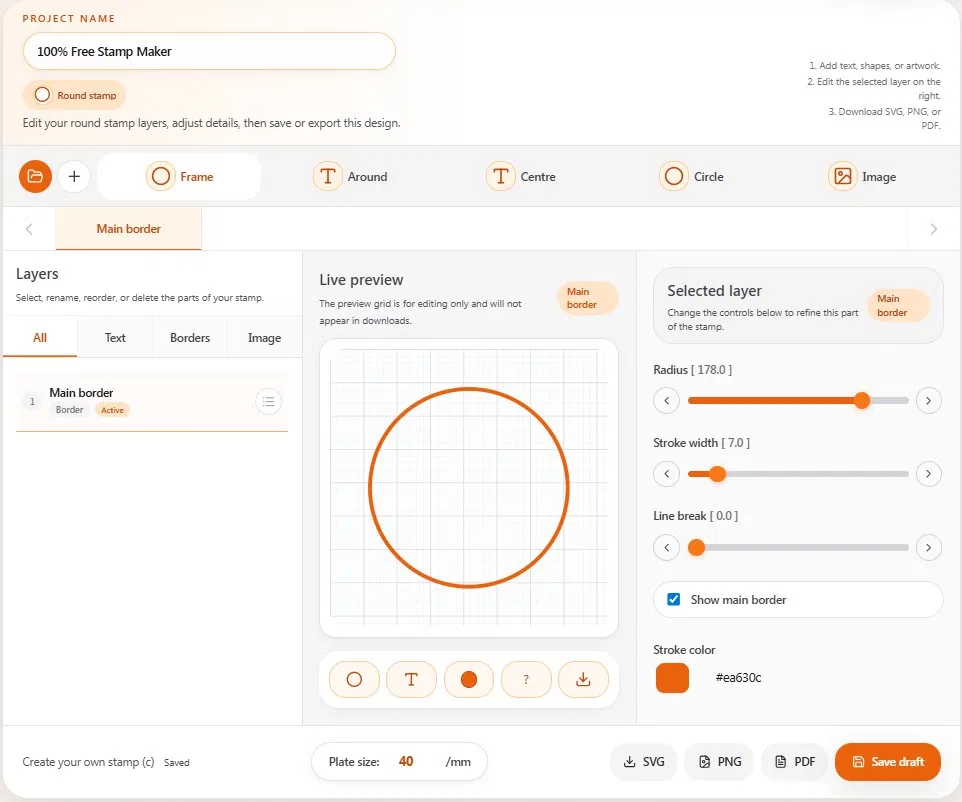
Step 1 — Pick a shape (or start from a template)
Round, oval, or rectangular. If you want a head-start, browse the stamp templates for a layout close to what you have in mind. If you'd rather start clean, open a blank canvas — both work.
Step 2 — Add your text and adjust
Type the company name, the registration number, or whatever copy belongs on the stamp. Pick a font that matches the formality of the document it'll go on. Adjust the border style, the ring weight, the text size, and the colour. The live preview updates as you type, so there's nothing to imagine — what's on screen is what downloads.
If your stamp needs a logo, upload an image and drop it into place.
Step 3 — Download as PNG, SVG, or PDF
One click. The file saves to your device with a transparent background, no watermark, no branding overlay. Drop it straight into a Word document, a PDF, or an email attachment. Done.
Export formats — and when to use which
Three formats, three different jobs. Knowing which one to pick saves a round of regret later.
PNG (transparent background) — best for digital documents
This is the format most people want. Transparent background means your stamp sits on any document — white paper, coloured letterhead, styled PDF — without an ugly white box around it. Use this when you're inserting the stamp into Word, Google Docs, an email signature, or directly onto a PDF page.
SVG — best for resizing and physical printing
SVG is a vector format. Unlike PNG, it stays sharp at any size — 100 px wide or two metres wide, same crisp edges. Use this when you might need to resize the stamp significantly, or when you're sending the design to a print shop to produce an actual physical rubber stamp.
PDF — best for direct PDF placement
If you're working in a PDF tool that prefers PDF imports over images, use this format. Same content, packaged differently.
All three formats are free. There's no premium-only export. There's no "PNG free, SVG paid" trick. Pick whichever fits the job.
How to add your stamp to a document
A stamp file is only useful when it's actually on the document. Here's the quick version for the most common cases:
Adding a stamp to a PDF
Open the PDF in any PDF editor (Adobe Acrobat, Foxit, PDF24, or any free browser-based PDF tool). Use the Insert Image or Add Stamp option, choose your downloaded PNG, and drop it where you want it. Resize by dragging the corners. Save the PDF.
Adding a stamp to a Word document
In Microsoft Word: Insert → Pictures → This Device. Select your PNG. Once it's in the document, right-click the image, choose Wrap Text → In Front of Text, and drag it to position. The transparent background means it'll sit cleanly on whatever's underneath — including signatures and printed content.
Adding a stamp to Google Docs
Insert → Image → Upload from computer. After it appears, click the image, choose Image options → Wrap text or Behind text, and position it.
Adding a "PAID" stamp to an invoice
This is a common one. Design your "PAID" stamp here, download it as a PNG, then open the Invoice Maker — there's a section for uploading a stamp directly onto the invoice before you download the final PDF. Whole workflow takes about a minute.
Who actually uses this tool
Small business owners
You need an official-looking stamp for documents going out to clients, banks, and government offices. You don't want to pay a designer £80 for something you can make in two minutes. The business stamp maker layouts cover the standard formats.
Company founders setting up new entities
You've just registered a new company. You need a stamp with the company name, registration number, and city — usable on contracts, receipts, and official paperwork from day one. The company-seal templates are built around exactly this.
Office managers and admin staff
Approval stamps, "Paid" stamps, "Received" stamps, "Copy" stamps. The everyday workflow marks that real offices actually use. Build a small library of office stamps once, reuse them forever.
Schools and education
Library stamps, grading stamps ("Excellent", "Checked", "See me"), school office stamps, attendance stamps. The school stamp maker is just a starting point — pick a template, change the text, you're done.
Clinics, doctors, and small practices
Name + registration-number stamps for prescriptions, referrals, and patient records. (Important note: ToolBody produces stamp images. The legal weight of any stamp depends on the regulations in your jurisdiction — this is a design tool, not a regulatory product.)
Freelancers and consultants
A clean personal or business-name stamp on quotes, contracts, and invoices reads as more professional than a typed signature line. Make one once, use it on everything.
Why the ToolBody Stamp Maker is different
There are other free stamp makers out there. The honest differences come down to specific things most of them get wrong:
The download is genuinely free. Several popular "free" stamp makers let you design for free but charge for a watermark-free download. ToolBody doesn't.
All three export formats are free. Some tools give you PNG for free but lock SVG behind a paywall. We don't.
Transparent backgrounds, automatically. Every PNG download has a clean transparent background by default. No checkbox to remember, no "premium feature".
No sign-up wall. You don't need an email address to download. You don't need to verify anything. You don't need to dismiss a modal asking for an account.
Works for physical stamps too. Most online stamp generators are digital-only. Our SVG export is print-shop friendly — if you ever want a real rubber stamp manufactured from your design, the file is ready.
Templates for real workflows. The template library covers actual use cases — company seals, school stamps, office workflow marks — not just generic shapes.
Honest limits — what this tool doesn't do
A short note in the interest of being straight with you:
Notary seals and government seals. ToolBody is a general design tool. Notary seals, court seals, and government-issued stamps are regulated items — the legal authority of those marks comes from the issuing body, not from a design tool. Don't use this to recreate official seals you're not authorised to use.
Cryptographic stamps or digital signatures. This tool makes stamp images. If you need a cryptographic digital signature or a certified e-seal with an audit trail, you need a regulated e-signature provider, not an image tool.
High-volume bulk production. The Stamp Maker is built for one-at-a-time custom design. If you need fifty different employee name stamps generated automatically, you'd want a custom batch solution.
For everything else — round seals, company stamps, approval marks, custom designs, school and office stamps — this is exactly the tool.
A few small touches that matter
Live preview, not "click to refresh". Every change updates instantly. You see the final stamp the whole time you're designing.
Mobile and tablet support. Design a stamp on your phone, download it, attach it to an email — full workflow, no desktop required.
No installation, no maintenance. It runs in the browser. There's nothing to download, nothing to update, no app permissions to worry about.
Your design stays yours. Nothing is uploaded to ToolBody's servers. Close the tab and the design is gone from our side — it only exists on your device.
Browse templates by category
Not sure where to start? Pick the closest match:
Company seal templates — round seals with name + registration number layouts
Round stamps — circular designs with curved text
Approval & workflow stamps — "Approved", "Paid", "Received", "Copy", "Draft"
School stamps — library, grading, office, attendance
Custom blank — start from scratch with no preset
Every template opens directly in the editor. Change anything you want — the template is just a starting point, not a final design.
Why ToolBody exists (the short version)
Small businesses, freelancers, schools, and small offices have the same boring problem: tools built for big organisations are over-engineered for what they actually need.
You want a stamp. The "stamp maker" wants you to upgrade. The design suite wants a subscription. The print shop wants a £40 minimum order. So a small job that should take two minutes turns into either a procurement saga or an "Approved" stamp written by hand in red marker.
ToolBody is the in-between answer. Free tools that do one thing well, in the browser, with no accounts and no watermarks. Stamps today, invoices and signatures next door — and more coming. Open the Invoice Maker Open the Signature Maker Browse stamp templates