Free Online Stamp Maker — Company Seals, Round & Oval Stamps
Free Online Stamp Maker - Design professional company seals, approval stamps, and office stamps online with logo upload and SVG, PNG, PDF export.
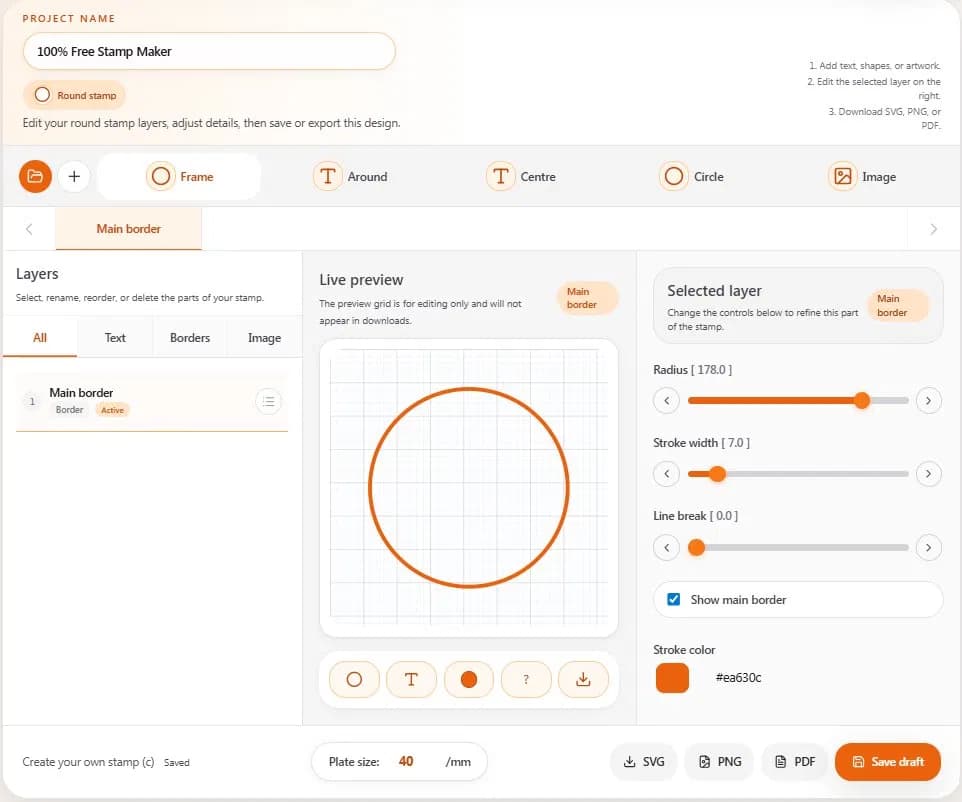
Whether you run a small business, manage a school office, or handle contracts at a legal firm, a professional stamp carries real authority. But ordering one from a print shop takes days and costs money. A free online stamp maker changes that — you design it in the browser, export it in minutes, and use it on any document right away.
This guide explains everything you need to know about creating company seals, round stamps, approval marks, and office stamps using a browser-based editor — no design experience or paid software required.
Why Businesses Are Switching to Online Stamp Makers
Traditional stamp creation means visiting a local print shop, waiting several days, and paying a fixed price for a fixed design. If your company details change, you order again from scratch.
Online tools remove every one of those barriers. You can create stamp online free, edit the design at any time, and export a clean transparent-background file that works on PDFs, invoices, and official documents.
Industry | Common Stamp Type |
Corporate offices | Company seal, authorised signatory |
Schools and colleges | Official school stamp, certificate seal |
Hospitals and clinics | Medical approval stamp |
Legal and finance | Notary seal, document verification stamp |
Retail and e-commerce | Invoice stamp, packaging mark |
Freelancers | Personal signature stamp |
What Makes a Good Stamp Editor?
Layer-Based Editing
Every element — border rings, curved text, centre titles, logos, and shapes — should sit on its own editable layer. This gives you precise control over order, spacing, and visibility without rebuilding the entire design from scratch.
Shape-Aware Text Paths
Round stamps need text that follows a circular arc. Oval stamps need text that follows a true oval path. A quality company seal maker online handles this automatically, so your curved text always looks balanced regardless of stamp shape.
Logo and SVG Upload
Modern business stamps often include a company logo at the centre. Look for a tool that accepts SVG files so logos stay sharp at any size, and lets you recolour vector graphics without leaving the editor.
Multiple Export Formats
SVG is best for printing and future editing. PNG with a transparent background is ideal for overlaying on digital documents. PDF is the standard for sharing and archiving.
How to Create a Company Seal Online — Step by Step
Using our free online stamp maker, the whole process takes about five minutes.
1. Choose a shape. Select round, oval, or rectangle. Round stamps are the most common for company seals and approval stamps.
2. Set the border. Adjust radius, stroke width, and colour. Most professional seals use a single or double-ring border.
3. Add curved text. Type your company name on the Around layer. Text follows the circular path automatically.
4. Add a centre title. Place your registration number, department name, or "OFFICIAL SEAL" at the centre.
5. Upload your logo. Drop in an SVG or transparent PNG. Resize and recolour as needed.
6. Export and save. Download as SVG, PNG, or PDF. Save your draft to edit it later.
Round, Oval, or Rectangle — Which Shape Should You Use?
Round stamps are the global standard for company seals. Oval stamps suit retail and packaging. Rectangle stamps work best for approval marks like RECEIVED, PAID, or APPROVED. A dedicated round stamp generator online handles arc text automatically — the main technical difference from basic free generators.
Save Time with Stamp Templates
Pre-built templates give you a professional layout in seconds. Choose a category — business, legal, medical, or school — then replace placeholder text with your own details. Every element remains fully editable after selection.
Save Projects and Reuse Your Design
A well-built approval stamp maker online stores every layer, colour, font, and spacing setting so you can reopen the exact same design later — ideal for businesses managing multiple departments, each needing its own stamp variant.
Frequently Asked Questions
Is the stamp maker really free?
Yes. Design, edit, and export at no cost. No account is required to start editing.
Can I use the stamp on official documents?
A transparent PNG stamp can be placed on PDF contracts, invoices, and certificates. For physical use, take the exported SVG to any print shop to produce a rubber or self-inking stamp.
What file formats can I download?
SVG (scalable vector), PNG (transparent background), and PDF (print and share).
Can I upload my company logo?
Yes. SVG and PNG logos are supported. SVG files stay sharp at any size and can be recoloured directly inside the editor.
Start Designing Your Stamp Now
With a free online stamp maker, you have everything in your browser — layers, curved text, logo upload, and clean exports in SVG, PNG, or PDF. Open the editor, choose your shape, and have a ready-to-use stamp in minutes.